

Virtualised architecture: more flexible, better protected servers
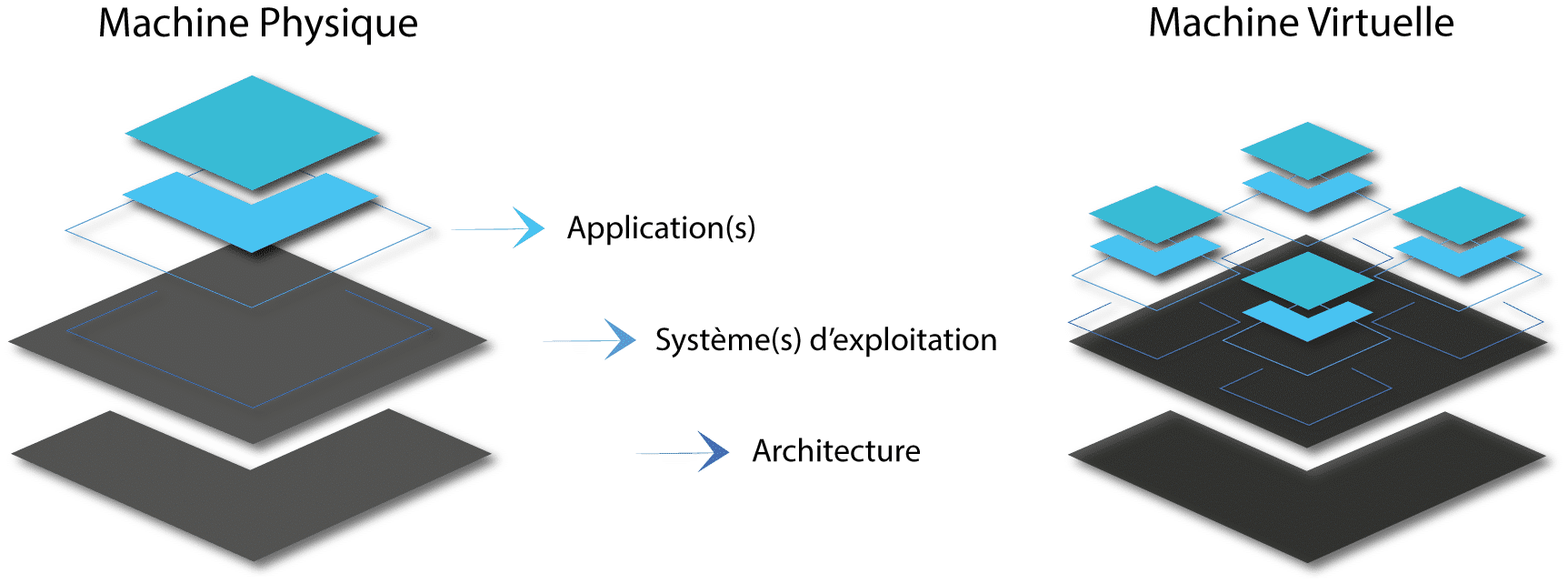
One or more physical servers, split into virtual servers that we design, host wherever you wish and run day to day.

Less hardware, better used
Several servers on one machine: less equipment to buy, power and maintain.
An incident that stays contained
Each virtual server is isolated: a software failure or an attack does not spread to the others.
Servers that can move
A virtual server can be copied, backed up in full and restarted elsewhere, without reinstalling everything.

One building, several flats
A physical server is often used at a fraction of its capacity. Virtualisation splits it into several virtual servers (e-mail, files, business software, website, etc.), like a building divided into flats: each has its own resources and its own door, and the whole is managed centrally.
We start from how you work, your security and performance requirements, and the way your teams access data, to design the architecture that suits you.
Brochures
Three ways to virtualise your servers
We recommend the option that suits your business, your budget and your business continuity needs.

Virtualised physical server
One machine, on your premises or at a hosting provider, split into virtual servers. The right starting point for most SMEs.
Private cloud
Several machines in a cluster: if one fails, your servers restart on another. For businesses that cannot afford to stop.

Hybrid
Your virtualised servers connected to the cloud, as if they were on the same network. Each service in the best place.
| Virtualised physical server | Private cloud | Hybrid | |
|---|---|---|---|
| If hardware fails | Recovery from backup | Automatic restart on another machine | Depends on the part affected |
| Budget | The most modest | Higher (several machines) | Adjusted service by service |
| Ideal for | One site, a few servers | A business that cannot stop | Several sites, varied needs |
To find out more: our sourced comparison of hosting options, including AWS and Azure.
Why controlling the hypervisor changes everything
The hypervisor is the software that splits a physical server into several virtual servers and shares out memory, processor and disk between them. It is a bit like the building manager: it allocates the flats and makes sure everyone stays in their own.
Depending on the hosting provider or your preference, we work with several well-known hypervisors, for example (non-exhaustive list): Proxmox VE, VMware vSphere, Virtuozzo or Microsoft Hyper-V. What matters is not the brand, but the fact that the hypervisor is administered by us on your behalf, rather than hidden behind the closed offering of a large cloud provider. Here is what this changes for your business.
A “snapshot” before every change
Before a sensitive update, we freeze the complete state of the server (a snapshot). If there is a problem, it can be rolled back in a few minutes.
Your servers can always be moved
A virtual server can be copied from one machine to another, from one hosting provider to another, even from one country to another. You are not locked in with a supplier.
Costs you can predict
You rent a known capacity. No bill that climbs with every gigabyte downloaded or every disk read, as with some pay-as-you-go clouds.
You know where your data is
We choose the country and the hosting provider with you. Your data stays in the jurisdiction that suits your business.
Each server in its own bubble
If a virtual server is attacked, the hypervisor isolates it from the others. We configure these partitions and the administration access ourselves.
The right tool, not a dead end
If a vendor suddenly changes its prices or terms, we can move your servers to another hypervisor without rebuilding everything.
For a detailed comparison of hosting options, their costs and data sovereignty, see our guide: physical server, virtualised, private cloud, AWS or Azure?
Do you need to keep an old system (Windows 7, Server 2012, CentOS 7…) for a piece of software or a machine? Find out how we virtualise and isolate obsolete systems.
What you gain
Savings
A single physical server can replace several conventional machines, and the cost of some licences may go down.
Stronger security
Partitioned servers, internal traffic that stays on the machine, restricted administration access.
Simpler backup and recovery
A virtual server can be backed up in full, without downtime, and restarted elsewhere. Backup and recovery are operated by WeDoBack.
Service continuity
With two physical machines, virtual servers automatically switch from one to the other in the event of a failure.
From your current setup to day-to-day operation
1. Discussion
Who manages your IT today, which software, how many users and sites.
2. Assessment
Inventory of servers, data and access; choice of option and hosting provider.
3. Proposal
Architecture, migration plan and operating model, described in writing.
4. Go-live
Migration with minimal interruptions, then day-to-day maintenance and monitoring.
Your questions about virtualisation
-
Do we have to change all our software?
No. Your software runs on virtual servers just as it does on conventional servers; your users will not see the difference.
-
Will the migration bring our business to a halt?
We prepare the switchover, test it on a copy and choose the time slot with you to limit the interruption. Rolling back is still possible.
-
Can we keep our servers on our premises?
Yes. Virtualisation works on your premises just as it does at a hosting provider; we simply recommend an off-site backup, operated by WeDoBack.
-
Who looks after the architecture afterwards?
We can run it under a managed IT services contract: updates, 24/7 monitoring and security. Backup is covered by a separate contract, with WeDoBack.
A client case
From 30 rented servers to 5 virtualised hosts
The problem
Its rented physical servers were reaching end of life: risk of failure, declining security and performance, and a heavy hosting bill.
What we did
- Migration of the 30 physical servers to virtual machines
- 5 virtualised physical hosts to run them
- Scheduled switchovers, server by server
What changed
Better security and performance, and 5 rented servers instead of 30: hosting costs fell sharply.
Let’s talk about your architecture
Describe your servers, your software and your users. We will suggest the right option and its cost.
Backup and restoration are operated by WeDoBack.